

Plugin settings
Updated:
On this page
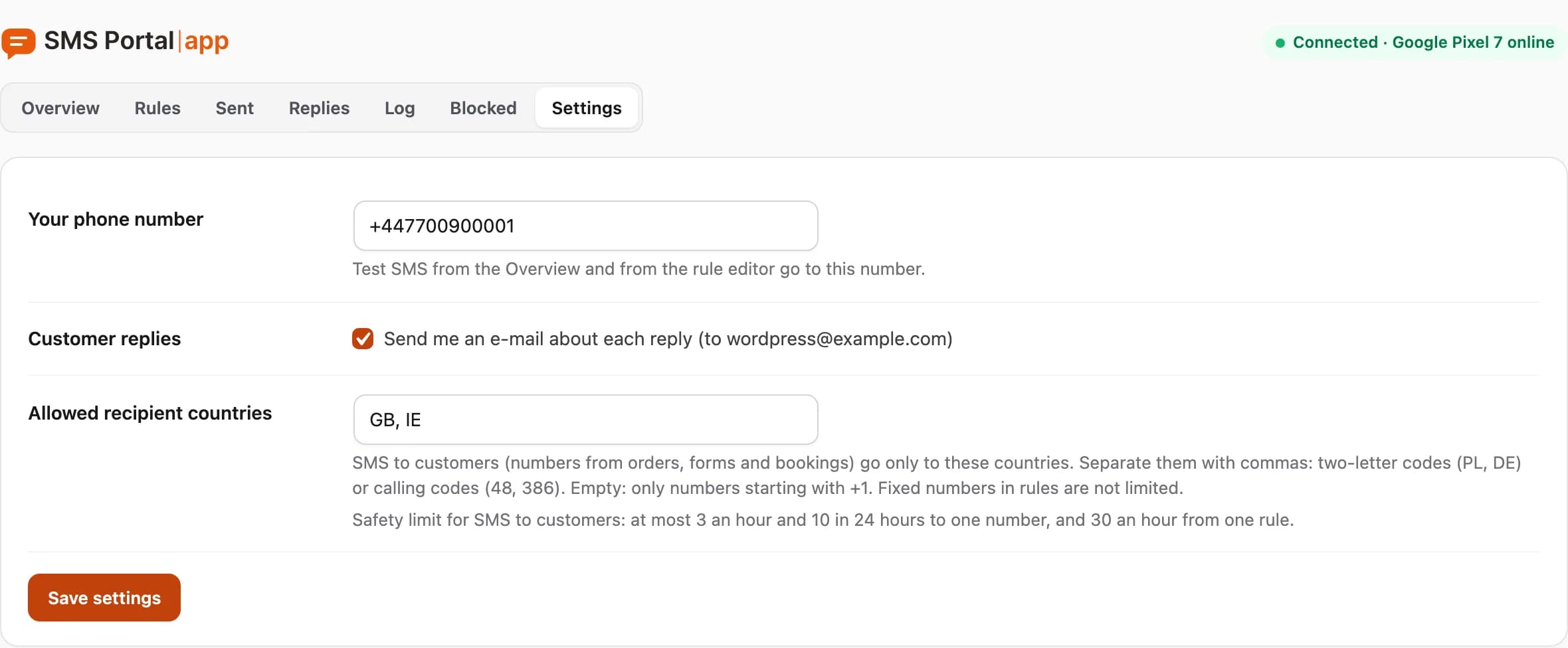
The Settings tab has three sections. After changes click Save settings and the message "Settings saved." appears.
Your phone number
Test SMS from the Overview and from the rule editor go to this number. Enter it with the country code. If the number is not valid, the plugin saves nothing and shows "Your phone number is not valid. Nothing was saved."
Without this number a test SMS cannot go out, and the plugin asks you to enter it.
Customer replies
The option "Send me an e-mail about each reply" decides whether you get an e-mail when a customer replies to an SMS. The address that will get the message is shown in brackets. You see replies under Replies anyway. More: customer replies and STOP.
Allowed recipient countries
This is the list of countries to which the plugin sends SMS to customers (numbers from orders, forms and bookings).
- Separate countries with commas.
- Enter two-letter codes (PL, DE) or calling codes (48, 386).
- An empty field means only numbers starting with your site's country calling code go out.
- Fixed numbers in rules are not limited.
If you enter something that is not a country code, the plugin rejects the save and shows which entry is wrong.
Under the field you also see the safety limit for SMS to customers: at most 3 an hour and 10 in 24 hours to one number, and 30 an hour from one rule. This limit protects your phone from abuse of public forms. It is not a paid option and you cannot change it on this screen.
What is not here
- SMS lifetime (12 hours by default) is set in each rule, under More settings. After that time an SMS waiting for the phone gets the status Expired. See rules.
- Data retention is a fixed 90 days: sent SMS, replies and technical logs are deleted then. Numbers on the block list stay until you remove them.
- The connection to your account is changed on the Overview: connecting WordPress.
Personal data
The plugin adds a suggestion to the privacy policy guide and supports the WordPress personal data export and erasure tools. What we keep is described in GDPR: what data we keep.
Questions and answers
- Where do I set how long an SMS may wait for the phone?
- In the rule editor, under More settings, in the field "Do not send if it is late by more than". The default is 12 hours.
Related guides
Didn’t find the answer? Contact us