

Plans and sending limits
Updated:
On this page
The plan decides how many outgoing SMS you can send in a month. You pay your SIM carrier for the messages themselves, because they go out from your phone. The plan pays for access to the dashboard, the app and the API.
Plans
| Plan | Outgoing SMS per month |
|---|---|
| Free | 300 |
| Pro | 3,000 |
| Unlimited | no plan limit |
The number of connected phones is not limited on any plan. Plan prices are on the Pricing page.
Check your usage
- In the menu click “Account”.
- Open the “Billing & plan” tab.
- In the “Outbound SMS this month” section you see the usage bar and the reset date.
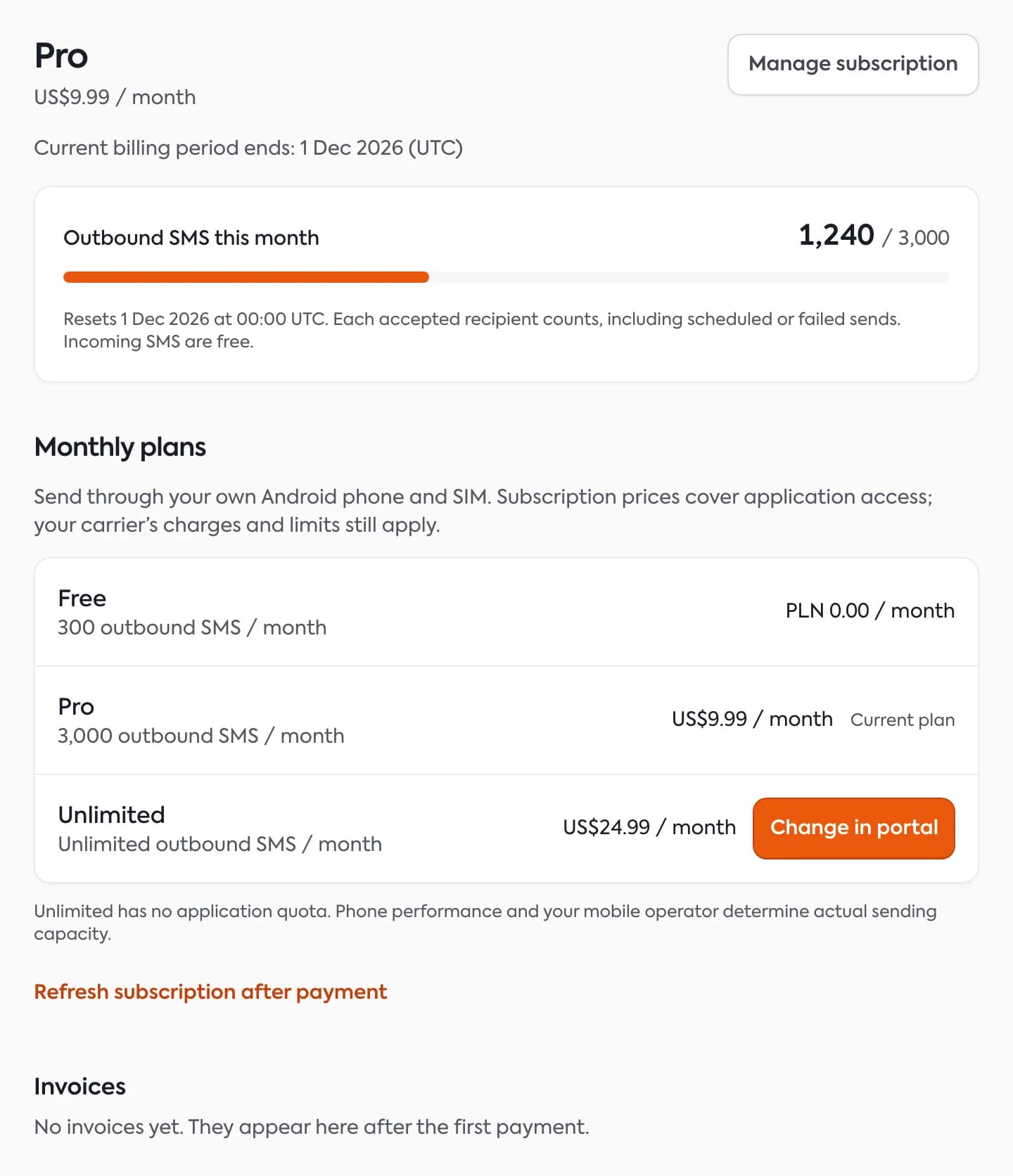
Under the bar there is a line such as: “Resets December 1 at 00:00 UTC”.
What counts toward the limit
- Every accepted recipient uses one unit of the limit. This includes scheduled messages and ones that later failed.
- A message to three people is three units.
- A long SMS made of several parts is still one unit per recipient.
- Received SMS are free and do not use the limit.
- Refreshing a message status does not use another unit.
The month is a calendar month in UTC. The limit resets on the first day of the month at 00:00 UTC. Changing the plan does not zero the usage during the month.
What happens when the limit is used up
New sends are held back and the API returns a limit error. This lasts until the first day of the next month or until you move to a higher plan. Receiving SMS keeps working.
Change your plan
- Go to “Account” → “Billing & plan”.
- In the “Monthly plans” section find the plan you want.
- Click the “Choose” button with the plan name. Your current plan has the “Current plan” label. If online payments are not enabled yet, the dashboard says so next to the plans.
- After paying, click “Refresh subscription after payment” if the plan did not change by itself.
Payments run through Stripe. You manage a paid plan with the “Manage subscription” button, which opens the Stripe payment portal. We issue the invoice once you have paid and e-mail it to you. All invoices are also lower down, in the “Invoices” section, with the “Download PDF” and “Open” buttons, and in the Stripe portal. More about payments: Payments, plan changes, invoices.
The Unlimited plan has no application quota, but the phone’s performance and your carrier limit the real number of sends.
Questions and answers
- Does a message with several parts count as several SMS?
- No. The limit counts recipients, not message parts. Your carrier bills the parts under your own tariff.
- Does SMS Portal|app charge for each SMS?
- No. Messages go out from your SIM card, so you pay your carrier for them under your own tariff.
Related guides
Didn’t find the answer? Contact us